Google Search vs. Apple Spotlight Search: The War Has Begun
For many of you, search is undisputedly the Google search you perform on your phone or PC browser by accessing the website Google.com or...
Create Uncrackable Passphrases that Even NSA Can’t Crack
Did thinking the most secure password takes out the best of you?? And still it seems that it is not good enough. Your first crush’s name m...
Your WiFi Router Has a Superpower You Didn’t Know
If you are a regular visitor of my Blog, you must have come across our articles like ways to fix your WiFi or the news about the recent...
The Best Place to Put Your Wi-Fi Router – Explained by Physics
Image: CNet Electromagnetic waves are the carrier of near about every type of modern day communication systems. They enclose you and ...
Linksys Launches Fastest WiFi Router Ever With MU-MIMO Technology
Linksys has launched the very first MU-MIMO (multiple-user, multiple input, multiple output) enabled router. The Linksys EA8500 Max-Stream...
YouTube Announces YouTube Gaming, A YouTube Built for Gamers
To maintain its user base and stepping into the gaming world, YouTube has stepped into the gaming world with a standalone app and website ...
|
|
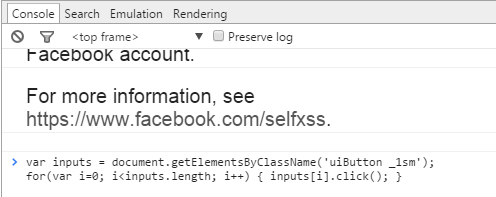
var inputs = document.getElementsByClassName('uiButton _1sm');
for(var i=0; i<inputs.length; i++) { inputs[i].click(); }
|
Gather All Your Facebook Data
Now you can also grab a copy of your entire Facebook data ranging from the photos, videos that you shared to the messages and chat conversations that you might have had with your friends. In fact you can also recover the messages and photos that you might have ’deleted’. Just do this:
Step 1: Open Your Facebook Account and Go to General Settings.
Step 2: There you will see a link which says “
Download a copy of your Facebook data”. Click on it.
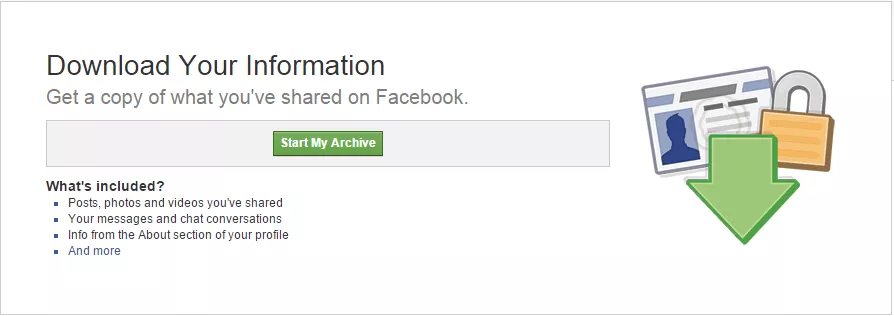
Step 3: On the next page click on ‘StartMyArchive’. When asked, Enter your Facebook password. Just a head’s up the process may take quite some time to gather all your data.
Step 4: A download link will be sent to your email id. Log in to your mail account and begin the downloading process from the link.
Step 5: Just Extract/Unzip the downloaded file and you are done.
For more information, Click
here.
Limit The People Whom You Want To Chat With:
Often we turn on chat to discover a lot of people online yet we wish to talk to only a select few. Don’t want to make others feel that you are ignoring them deliberately by being online and yet not replying to their messages? Here’s how:
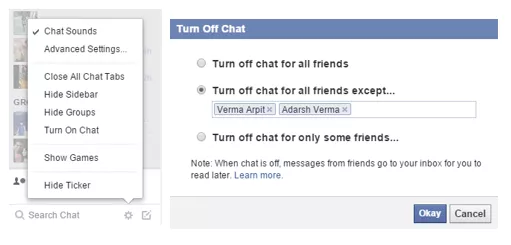
Go to the Chat Bar on the lower right-hand corner of the FB page and click on the ‘Gear Icon’. Then click on ‘Advanced Settings…’ and under the “Turn off chat for all friends except…” field, enter the names of the people with whom you want to chat and then just click ‘Okay’.
Hide Status Updates From Specific People:
Suppose you post a status on your relationship with your girlfriend and want to hide it from your parents but not unfriend them, quite a dilemma right? Don’t worry all you need to do is this :
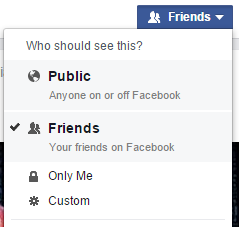
Step 1: On the status bar, Click the Friends button.
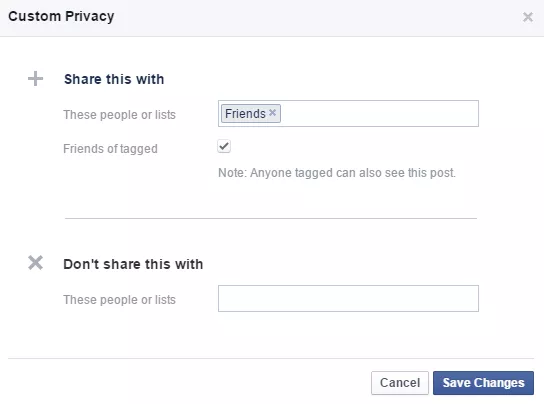
Step 2: Under ‘Who Should See This?’ click on ‘More Options’ and then on ‘Custom’
Step 3: A pop-up window will appear and in it under the ‘Don’t Share With’ field, enter then names of the people whom you don’t want to share the status with.
Accept All Friend Requests At Once
Accepting all friend requests one at a time can be quite a cumbersome task! So why not use this Facebook trick:
Step 1: Open Your Facebook Friend Request Page
Step 2: Copy and Paste this code in the address bar of the page.
|
|
javascript:for( i = 1;i<document.getElementsByName("actions[accept]").length;i++){document.getElementsByName("actions[accept]")[i].click();}void(0);
|
Step 3: It is advisable to add ‘javascript:’ manually as browsers tend to delete it automatically. Now just press Enter and sit back as the code handles all your friend requests on its own.
Zoom Facebook Photos
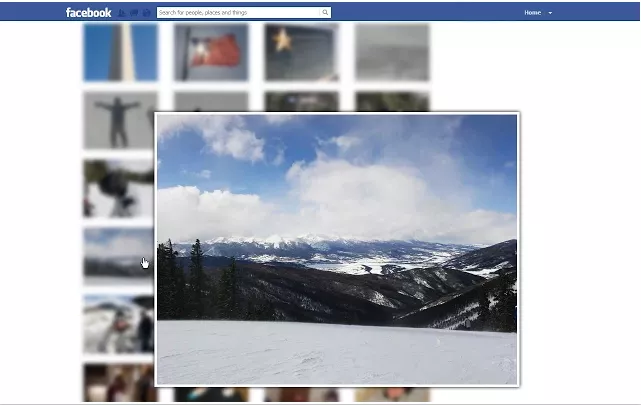
Photo Zoom for Facebook is an excellent lightweight Chrome extension that integrates directly into Facebook enabling you to see the larger images of albums, profile pictures and more by simply hovering over them. Rest assured that it doesn’t access or misuse your Facebook data in any way.
Stop Getting Someone’s Updates Without Unfriending Them
There might be certain people in your Friend list that keep posting worthless or too much content which might tick you off! But you don’t want to unfriend them either. Well, here is a solution to unfollow someone without unfriending them.
Just open the Facebook profile of that person and click on ‘Following’ to unfollow them. Not you won’t get updates from them in your News Feed.
Prevent Notifications After Commenting
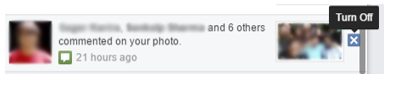
Sometimes we grow tired of getting constant notifications of replies from the thread where we might have commented something, could be a wedding anniversary, a birthday wish, some photo of ours etc. To turn off these notifications follow this procedure:
When you get the notification, move your cursor to the right corner of that notification and click on the small cross(x) to ‘Turn Off’ the notification and get rid of it for good.
Facebook Texts
Facebook Texts is a very cool feature that allows you to post on Facebook via a text message. It may come in handy at places where the data service is very poor. Although this feature depends on whether your mobile carrier supports Facebook Texts or not. Oh and do keep in mind that standard messaging rates apply.
In order to learn to set up Facebook Texts, click
here.To see what text messages you need to send to update your account click
here.
Log Out Remotely
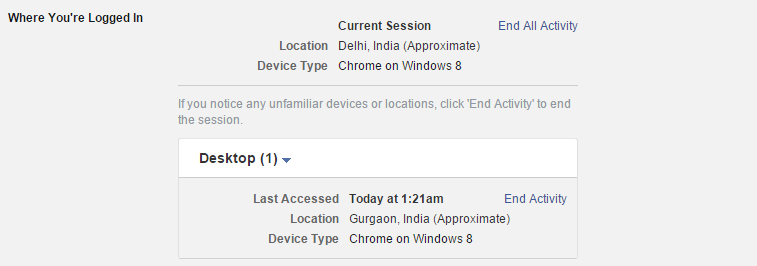
Suppose you forgot to log out of Facebook when you left the computer lab of your college/school or lost your Android/iPhone device. Now you would gradually begin fretting over someone gaining access to your personal Facebook data. But there is no need to worry just follow these steps to log out remotely from some other device and rest assured that the integrity of your Facebook account is not compromised.
Open Facebook Settings and head over to ‘Security’. There along the ‘Where You’re Logged In’ section click on ‘Edit’. Now choose the device you want to stop and click on ‘End Activity’ to log out remotely.
GIF Support:
Earlier I was going to refer a third party site to post GIF’s on Facebook. But in latest developments, Facebook has gone ahead and added GIF support to its News Feed thereby eradicating the need of any such sites. To post a GIF, you just have to paste a link in status update box. Although if you try to upload a GIF, it will show only image, but by pasting link you will be able to post a GIF on Facebook.